Amazon Elastic Compute Cloud (Amazon EC2) provides scalable computing capacity in the Amazon Web Services (AWS) cloud.
Warning: the Pro Exam will not focus on the deep elements from the services, but how you can make use of the "pieces" to build an architecture on AWS Cloud.
Features of Amazon EC2
Amazon EC2 provides the following features:
- Virtual computing environments, known as instances
- Preconfigured templates for your instances, known as Amazon Machine Images (AMIs), that package the bits you need for your server (including the operating system and additional software)
- Various configurations of CPU, memory, storage, and networking capacity for your instances, known as instance types
- Secure login information for your instances using key pairs (AWS stores the public key, and you store the private key in a secure place)
- Storage volumes for temporary data that's deleted when you stop or terminate your instance, known as instance store volumes
- Persistent storage volumes for your data using Amazon Elastic Block Store (Amazon EBS), known as Amazon EBS volumes
- Multiple physical locations for your resources, such as instances and Amazon EBS volumes, known as regions and Availability Zones
- A firewall that enables you to specify the protocols, ports, and source IP ranges that can reach your instances using security groups
- Static IP addresses for dynamic cloud computing, known as Elastic IP addresses
- Metadata, known as tags, that you can create and assign to your Amazon EC2 resources
- Virtual networks you can create that are logically isolated from the rest of the AWS cloud, and that you can optionally connect to your own network, known as virtual private clouds (VPCs)
Instance Types:
| Type | Class | Characteristics | Use Cases |
|---|---|---|---|
T2
|
General Purpose
|
High Frequency Intel Xeon Processors with Turbo up to 3.3GHz Burstable CPU, governed by CPU Credits, and consistent baseline performance Lowest-cost general purpose instance type, and Free Tier eligible (t2.micro only) Balance of compute, memory, and network resources |
Development environments, build servers, code repositories, low-traffic websites and web applications, micro services, early product experiments, small databases. |
M4
|
General Purpose
|
2.4 GHz Intel Xeon® E5-2676 v3 (Haswell) processors EBS-optimized by default at no additional cost Support for Enhanced Networking Balance of compute, memory, and network resources |
Small and mid-size databases, data processing tasks that require additional memory, caching fleets, and for running backend servers for SAP, Microsoft SharePoint, cluster computing, and other enterprise applications. |
M3
|
General Purpose
|
High Frequency Intel Xeon E5-2670 v2 (Ivy Bridge) Processors SSD-based instance storage for fast I/O performance Balance of compute, memory, and network resources |
Small and mid-size databases, data processing tasks that require additional memory, caching fleets, and for running backend servers for SAP, Microsoft SharePoint, cluster computing, and other enterprise applications. |
C4
|
Compute
Optimized |
High frequency Intel Xeon E5-2666 v3 (Haswell) processors optimized specifically for EC2 EBS-optimized by default and at no additional cost Ability to control processor C-state and P-state configuration on the c4.8xlarge instance type Support for Enhanced Networking and Clustering |
Same as C3 |
C3
|
Compute
Optimized |
High Frequency Intel Xeon E5-2680 v2 (Ivy Bridge) Processors Support for Enhanced Networking Support for clustering SSD-backed instance storage |
High performance front-end fleets, web-servers, batch processing, distributed analytics, high performance science and engineering applications, ad serving, MMO gaming, and video-encoding. |
X1
|
Memory
Optimized |
High Frequency Intel Xeon E7-8880 v3 (Haswell) Processors Lowest price per GiB of RAM 1,952 GiB of DDR4-based instance memory SSD Storage and EBS-optimized by default and at no additional cost Ability to control processor C-state and P-state configuration |
We recommend X1 instances for running in-memory databases like SAP HANA, big data processing engines like Apache Spark or Presto, and high performance computing (HPC) applications. X1 instances are certified by SAP to run Business Warehouse on HANA (BW), Data Mart Solutions on HANA, Business Suite on HANA (SoH), and the next-generation Business Suite S/4HANA in a production environment on the AWS cloud. |
R3
|
Memory
Optimized |
High Frequency Intel Xeon E5-2670 v2 (Ivy Bridge) Processors SSD Storage Support for Enhanced Networking |
We recommend R3 instances for high performance databases, distributed memory caches, in-memory analytics, genome assembly and analysis, Microsoft SharePoint, and other enterprise applications. |
G2
|
GPU
|
High Frequency Intel Xeon E5-2670 (Sandy Bridge) Processors High-performance NVIDIA GPUs, each with 1,536 CUDA cores and 4GB of video memory Each GPU features an on-board hardware video encoder designed to support up to eight real-time HD video streams (720p@30fps) or up to four real-time full HD video streams (1080p@30fps) Support for low-latency frame capture and encoding for either the full operating system or select render targets, enabling high-quality interactive streaming experiences |
3D application streaming, machine learning, video encoding, and other server-side graphics or GPU compute workloads. |
I2
|
Storage Optimized
|
High Frequency Intel Xeon E5-2670 v2 (Ivy Bridge) Processors SSD Storage Support for TRIM Support for Enhanced Networking High Random I/O performance |
NoSQL databases like Cassandra and MongoDB, scale out transactional databases, data warehousing, Hadoop, and cluster file systems. |
D2
|
Storage Optimized
|
D2 instances feature up to 48 TB of HDD-based local storage, deliver high disk throughput, and offer the lowest price per disk throughput performance on Amazon EC2. |
Massively Parallel Processing (MPP) data warehousing, MapReduce and Hadoop distributed computing, distributed file systems, network file systems, log or data-processing applications |
Networking and storage features:
| # | VPC only | EBS only | SSD volumes | Placement group | HVM only | Enhanced networking |
|---|---|---|---|---|---|---|
C3
|
Yes
|
Yes
|
Intel 82599 VF
| |||
C4
|
Yes
|
Yes
|
Yes
|
Yes
|
Intel 82599 VF
| |
D2
|
Yes
|
Yes
|
Intel 82599 VF
| |||
G2
|
Yes
|
Yes
|
Yes
| |||
I2
|
Yes
|
Yes
|
Yes
|
Intel 82599 VF
| ||
M3
|
Yes
| |||||
M4
|
Yes
|
Yes
|
Yes
|
Yes
|
Intel 82599 VF
| |
R3
|
Yes
|
Yes
|
Yes
|
Intel 82599 VF
| ||
T2
|
Yes
|
Yes
|
Yes
| |||
| X1 | Yes | Yes | Yes | Yes | ENA |
Pricing
What is important to know are the 3 basic pricing types:
- On-demand - pay as you go. Good for eventual usage, testing, etc.
- Reserved - discounts for partial, total or no upfront - but reserved for 1 or 3 years. Good for 24x7 long-term running systems
- Spot - like the stock market, you say your price to buy and when this price is reached you get the instances, when price goes up, you lose them. Good for batch processing, workflow-based apps.
AMIs
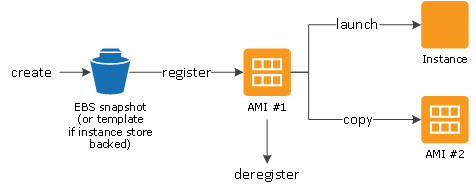
The following diagram summarizes the AMI lifecycle. After you create and register an AMI, you can use it to launch new instances. (You can also launch instances from an AMI if the AMI owner grants you launch permissions.) You can copy an AMI to the same region or to different regions. When you are finished launching instance from an AMI, you can deregister the AMI.
Network and Security
This is a broad topic. I suggest that you review the features as stated in the documentation:
Amazon EC2 provides the following network and security features.
Features
- Amazon EC2 Key Pairs
- Amazon EC2 Security Groups for Linux Instances
- Controlling Access to Amazon EC2 Resources
- Amazon EC2 and Amazon Virtual Private Cloud
- Amazon EC2 Instance IP Addressing
- Elastic IP Addresses
- Elastic Network Interfaces (ENI)
- Placement Groups
- Network Maximum Transmission Unit (MTU) for Your EC2 Instance
- Enhanced Networking on Linux
Elastic Load Balancing
Elastic Load Balancing provides the following features:
- You can use the operating systems and instance types supported by Amazon EC2. You can configure your EC2 instances to accept traffic only from your load balancer.
- You can configure the load balancer to accept traffic using the following protocols: HTTP, HTTPS (secure HTTP), TCP, and SSL (secure TCP).
- You can configure your load balancer to distribute requests to EC2 instances in multiple Availability Zones, minimizing the risk of overloading one single instance. If an entire Availability Zone goes offline, the load balancer routes traffic to instances in other Availability Zones.
- There is no limit on the number of connections that your load balancer can attempt to make with your EC2 instances. The number of connections scales with the number of concurrent requests that the load balancer receives.
- You can configure the health checks that Elastic Load Balancing uses to monitor the health of the EC2 instances registered with the load balancer so that it can send requests only to the healthy instances.
- You can use end-to-end traffic encryption on those networks that use secure (HTTPS/SSL) connections.
- [EC2-VPC] You can create an Internet-facing load balancer, which takes requests from clients over the Internet and routes them to your EC2 instances, or an internal-facing load balancer, which takes requests from clients in your VPC and routes them to EC2 instances in your private subnets. Load balancers in EC2-Classic are always Internet-facing.
- [EC2-Classic] Load balancers for EC2-Classic support both IPv4 and IPv6 addresses. Load balancers for a VPC do not support IPv6 addresses.
- You can monitor your load balancer using CloudWatch metrics, access logs, and AWS CloudTrail.
- You can associate your Internet-facing load balancer with your domain name. Because the load balancer receives all requests from clients, you don't need to create and manage public domain names for the EC2 instances to which the load balancer routes traffic. You can point the instance's domain records at the load balancer instead and scale as needed (either adding or removing capacity) without having to update the records with each scaling activity.
Auto Scaling
The following table describes the key components of Auto Scaling.
Groups
Your EC2 instances are organized into groups so that they can be treated as a logical unit for the purposes of scaling and management. When you create a group, you can specify its minimum, maximum, and, desired number of EC2 instances. For more information, see Auto Scaling Groups.
| |
Launch configurations
Your group uses a launch configuration as a template for its EC2 instances. When you create a launch configuration, you can specify information such as the AMI ID, instance type, key pair, security groups, and block device mapping for your instances. For more information, see Launch Configurations.
| |
Scaling plans
A scaling plan tells Auto Scaling when and how to scale. For example, you can base a scaling plan on the occurrence of specified conditions (dynamic scaling) or on a schedule. For more information, see Scaling Plans.
|


Conclusion
As told you in the beginning this is a brief overview from EC2 service and its main components. You should go deeper on some points but for the Professional Exam the goal is not to reply questions from the inner settings from each service, but to know how to combine them to build secure, cost-effective, elastic and scalable solutions.


